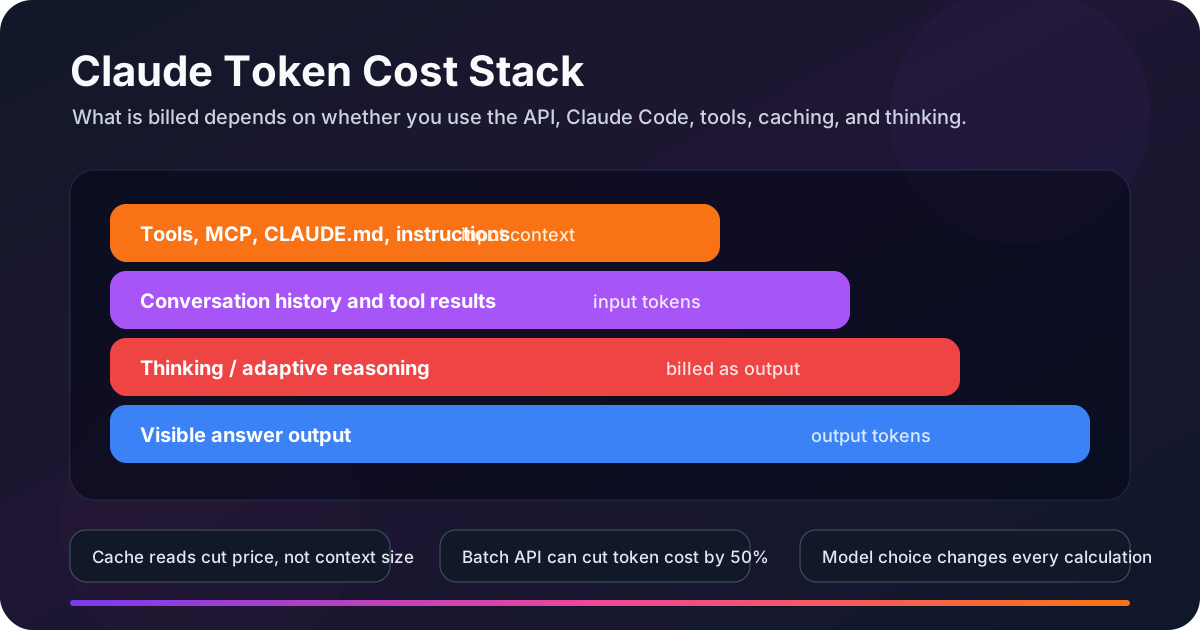
Short answer: Claude token cost depends on the complete request, not just the message you type. Instructions, tool definitions, history, and tool results become input; answers and thinking become output. Cache writes and reads have separate input rates, and some server tools add fees. Claude Code also manages project context: CLAUDE.md, skills, MCP server context, file reads, and command output.
This guide separates Claude API, Claude Code prompting workflows, and claude.ai so you can estimate cost correctly instead of blaming one mysterious "hidden prompt" for everything.
Quick Takeaways
- API calls are stateless: your application sends the prompt, tools, and conversation history that you want Claude to see.
- Claude Code is heavier than a simple API call: it carries coding context, project instructions, tool output, and session history.
- Prompt caching saves money, not context: cached tokens still occupy the context window.
- Thinking tokens are billed as output: Opus and Sonnet reasoning can be useful, but it is not free.
- MCP behavior has changed: Claude Code now defers MCP tool definitions by default, so unused servers are still worth disabling, but the old "all schemas always load" claim is too broad.
What Is a Token?
A token is a unit the model processes, often a word fragment rather than a whole word. A line count or character count is not a reliable budget: source code, JSON, non-English text, and images have different token footprints. Count the complete request with the model you will actually use.
Model migrations need a fresh count: Anthropic now describes the tokenizer used by Claude 4.7 and later as producing approximately 30% more tokens for the same text than the earlier tokenizer, with workload-dependent variation. That is not a universal 30% bill increase: rates, output length, and caching also change. See the pricing and tokenizer notes.
API vs Claude Code vs claude.ai
The biggest source of confusion is treating every Claude product as if it bills and behaves the same way. They do not.
claude.ai is different again: Free, Pro, Max, Team, and Enterprise plans are usage-plan products. They may expose usage limits, but the everyday consumer plan experience is not the same as directly paying the API invoice per million tokens. Keep API pricing examples separate from subscription-plan expectations.
The Claude Token Cost Formula
For standard API requests, use USD rates per million tokens (MTok). Separate five-minute and one-hour cache writes when both appear:
token_cost_usd = (
    uncached_input_tokens * input_rate
  + cache_write_5m_tokens * write_5m_rate
  + cache_write_1h_tokens * write_1h_rate
  + cache_read_tokens     * read_rate
  + output_tokens         * output_rate
) / 1_000_000

total_cost_usd = token_cost_usd + server_tool_fees_usd
Use the rates for your model, service mode, and provider. Thinking is already included in billed output; do not add it a second time. Tool schemas and returned tool text belong in the appropriate token buckets, not a separate per-token tool surcharge.
For Claude Code, add another layer: session context. File reads, command output, prior turns, subagent summaries, and project instructions can stay in the conversation and increase the size of later turns.
Three beginner-friendly cost examples
# 1) Sonnet 5 API call
Input:  12,000 tokens * $2  / 1,000,000 = $0.024
Output:    800 tokens * $10 / 1,000,000 = $0.008
Total: $0.032

# 2) Haiku 4.5 extraction job
Input:  100,000 tokens * $1 / 1,000,000 = $0.10
Output:   2,000 tokens * $5 / 1,000,000 = $0.01
Total: roughly $0.11

# 3) Opus 5 reasoning request
Input:   80,000 tokens * $5  / 1,000,000 = $0.40
Output:  8,000 tokens * $25 / 1,000,000 = $0.20
Total: roughly $0.60
These are hypothetical, uncached requests at standard global API rates, without server-tool fees or tax. Output totals include any thinking. They illustrate arithmetic, not measured model performance or a subscription charge.
Current Claude API Pricing
Last reviewed: September 18, 2026. Standard Claude API rates in USD per million tokens, before taxes or negotiated discounts:
| Model | Input / MTok | Output / MTok | Cache read / MTok | Context limit |
|---|---|---|---|---|
| Claude Haiku 4.5 | $1.00 | $5.00 | $0.10 | 200K |
| Claude Sonnet 5 | $2.00 | $10.00 | $0.20 | 1M |
| Claude Opus 5 | $5.00 | $25.00 | $0.50 | 1M |
| Claude Fable 5.1 | $10.00 | $50.00 | $0.25 | 1M |
Sources: model comparison, Sonnet 5, Opus 5, and Fable 5.1. Sonnet 5's $2/$10 rates are now standard; the previously announced September increase was cancelled. Existing Sonnet 4.6 workloads still use their own $3/$15 rates.
# Prompt caching multipliers
5-minute cache write  = 1.25x base input price
1-hour cache write    = 2.00x base input price
Cache read            = 0.10x base input price for Haiku 4.5, Sonnet 5, Opus 5
Fable 5.1 cache read  = 0.025x base input price

# Batch API
50% discount on input and output tokens for asynchronous bulk work
Pricing modifiers beginners miss
- Long context: the 1M models above use standard per-token rates across that window. More tokens still mean a larger bill.
- Data residency: first-party US-only inference adds 1.1x across token categories for Claude 4.6 and later. Partner-operated cloud platforms have their own regional pricing.
- Fast mode: the current research preview supports Opus 5 and Opus 4.8 at $10 input / $50 output per MTok, twice their standard rates. It is first-party only and incompatible with Batch. The old Opus 4.6 6x claim is no longer current.
Sources: Claude API pricing, context windows, extended thinking, prompt caching, Claude Code costs, and Usage and Cost API.
Hidden Cost 1: System and App Instructions
Every application has instructions that shape model behavior. In a raw API call, this is the system prompt and any messages you send. In Claude Code, the product also manages a coding-oriented environment and session state around your work.
There is no universal Claude Code overhead number that you can safely paste into every API estimate. Measure your actual session with /context, and count the system prompt and messages your API application sends. Avoid treating an unexplained screenshot of someone else's session as a benchmark.
Hidden Cost 2: CLAUDE.md, Skills, and Project Memory
Claude Code can load project instructions such as CLAUDE.md. That is helpful, but a long file becomes a repeated cost. Anthropic's current guidance is to keep the base file focused and move specialized workflow instructions into skills so they load on demand.
# Better CLAUDE.md pattern
- Keep repo-wide rules only
- Link to docs instead of pasting long docs
- Move PR review, deployment, or database workflows into skills
- Keep examples short and delete stale notes

# Check impact
/context
/usage
Hidden Cost 3: MCP and Tool Context
Old advice often says every MCP server injects every full schema into every request. Current Claude Code docs say MCP tool definitions are deferred by default: tool names and server instructions enter context, while full definitions load when needed. This is a Claude Code behavior, not a promise that every custom API client defers its tools.
The practical advice is still similar: disable unused MCP servers, prefer direct CLI tools such as gh, aws, or gcloud when they are more context-efficient, and run /context to see what is actually consuming space.
Hidden Cost 4: Conversation History
LLM APIs are stateless at the request boundary. Your app or client sends the relevant conversation history again so Claude can continue. That means long sessions get more expensive because later turns include more accumulated context.
- Turn 1: system instructions + user message + first answer.
- Turn 15: all useful prior context plus the new message.
- Long coding session: file reads, test output, error logs, and tool results can remain in the context until compacted or cleared.
Use /compact after a meaningful milestone and /clear when switching to an unrelated task. Do not carry yesterday's debugging context into today's documentation task.
Hidden Cost 5: Thinking Tokens
Thinking can consume output tokens beyond the visible answer. Sonnet 5 and Opus 5 enable adaptive thinking by default; Fable 5.1 keeps it always on. Use the response's billed output count, not the length of a displayed thinking summary. The diagram below is an illustration, not a measured request.
For simple transformations, test a lower output_config.effort. Disable thinking only where the chosen model supports it; Fable 5.1 does not. Check the thinking cost and effort guide, and compare answer quality before adopting the cheaper setting.
Hidden Cost 6: Tool Results
Tool calls are not just "actions." They create text that may enter the conversation. A 400-line stack trace, a full file read, or a large web fetch can add thousands of input tokens to later turns.
- Read exact file ranges instead of whole files.
- Filter logs before returning them to Claude.
- Use grep-like commands to locate relevant lines before reading full context.
- Summarize long command output before continuing a session.
Hidden Cost 7: API Tool Use and Server Tools
Tool definitions and results sent to Claude count as input. A generated tool_use block is output on that turn; when your app sends it back with a tool_result, it becomes part of the next request's input. Tool-enabling instructions can also add overhead. Count the full payload instead of estimating only the user's message.
- Client-side tools: usually cost normal input and output tokens, including schemas and tool results.
- Server-side tools: can add usage-based charges on top of tokens, such as web search requests or code execution time.
- Bash and editor tools: can add fixed input-token overhead plus command output, errors, and file contents.
- Beginner rule: do not send a giant universal tool list to every request. Send the smallest useful tool set for that workflow.
Hidden Cost 8: Claude Code Background Work and Subagents
Claude Code is not just a single chat request. It can use background tokens for features such as summaries and model-assisted session management. If you use subagents or agent teams, each agent may have its own context window. That can be excellent for parallel work, but it also means token usage scales with the number of active agents and the amount of context each one loads.
- Subagents are useful: delegate verbose searches, test runs, and log analysis so only a summary comes back to your main context.
- Subagents are not free: they still spend tokens in their own context window.
- Agent teams need budget discipline: keep team size small, keep prompts focused, and stop agents when the work is done.
- Auto-compaction helps: it can summarize long conversations when context gets large, but you should still use
/compactand/clearintentionally.
Prompt Caching Break-Even
Prompt caching is usually the highest-leverage API optimization when your prompt has a repeated prefix: tool definitions, system instructions, large documents, or a stable conversation prefix.
# Example: 100,000-token reusable prefix on Opus 5
Normal input cost:       100,000 * $5 / 1,000,000 = $0.50
5-minute cache write:    100,000 * $6.25 / 1,000,000 = $0.625
Cache read after write:  100,000 * $0.50 / 1,000,000 = $0.05

# Two uses of the same prefix, within the cache lifetime
Without caching: $0.50 + $0.50  = $1.00
With caching:    $0.625 + $0.05 = $0.675
Prefix savings: $0.325, or 32.5%

# One-hour writes cost $1.00 for this prefix
One write + two reads: $1.00 + $0.05 + $0.05 = $1.10
Three uncached uses:   $0.50 * 3             = $1.50
This comparison covers only the reusable prefix; new input and output still cost extra. With no reuse, the cache write costs more than ordinary input. Cached tokens also remain in the context window.
If caching does not work, check an identical prefix, an unexpired lifetime, and the minimum length. Sonnet 5 needs 1,024 tokens; Opus 5 and Fable 5.1 need 512; Haiku 4.5 needs 4,096. Changing earlier instructions or tools can invalidate later cached content. Inspect the usage fields rather than assuming a cache hit. See cache limitations and troubleshooting.
How to Reduce Claude Token Spend
1. Use the right model
- Haiku: extraction, classification, routing, simple rewriting, structured transformations.
- Sonnet: most coding, analysis, planning, documentation, and agentic workflows.
- Opus: high-stakes reasoning, hard architecture decisions, difficult debugging, long-horizon agent work.
- Fable: consider it when your evaluations show a meaningful improvement on demanding tasks; its cheaper cache reads do not cancel its higher output rate.
These are starting points to test, not guaranteed rankings for your application. Compare completed, correct tasks per dollar, including retries and tool calls.
2. Keep Claude Code context clean
- Use
/usageto see session token and cost estimates. - Use
/contextto inspect what is consuming the context window. - Use
/compactafter finishing a subtask. - Use
/clearbefore switching to unrelated work.
3. Reduce MCP and tool overhead
- Disable MCP servers you are not actively using.
- Prefer CLI tools when they return a smaller answer than an MCP integration.
- Keep tool output focused: file ranges, filtered logs, and summarized results.
4. Cache repeated API prefixes
The Python example below uses the anthropic SDK and ANTHROPIC_API_KEY from your environment. Provide your own project-guide.txt, a stable project reference large enough to meet Sonnet 5's cache minimum. The two generation calls incur API charges; token counts and cache hits depend on that file.
from pathlib import Path
from anthropic import Anthropic

client = Anthropic()
model = "claude-sonnet-5"
system = [{
    "type": "text",
    "text": Path("project-guide.txt").read_text(encoding="utf-8"),
    "cache_control": {"type": "ephemeral"},
}]

for question in (
    "Summarize the project's deployment process in five bullets.",
    "Which rollback checks does the project require?",
):
    messages = [{"role": "user", "content": question}]
    estimate = client.messages.count_tokens(
        model=model, system=system, messages=messages
    )
    print("Estimated input:", estimate.input_tokens)
    response = client.messages.create(
        model=model,
        max_tokens=1024,
        thinking={"type": "disabled"},
        system=system,
        messages=messages,
    )
    print(response.usage.model_dump_json(indent=2))
    for block in response.content:
        if block.type == "text":
            print(block.text)
The explicit breakpoint caches the stable system text while each question remains separate. This is two independent questions, not a conversation-history implementation. A small reference file can produce zero cache writes without an error. The Token Counting API estimates input, not future output, tool activity, or the final bill; include your client-tool definitions when your real request uses them.
5. Use batch processing for non-urgent bulk work
If the workload can wait, such as summarizing thousands of tickets, generating descriptions, or processing a large dataset, the Batch API can reduce both input and output token cost by 50%.
Worked Session Budget: Before and After Caching
Consider a hypothetical 30-request Opus 5 workflow. This is an arithmetic example, not a measured Claude Code session. Hold model, total input, and output constant to isolate the effect of caching. Assume global standard rates, only five-minute writes, no server-tool fees, and successful reuse before expiry.
# Input summed across all 30 requests, not one context window
Project/context input:      400,000 tokens
Conversation history:     1,300,000 tokens
Tool results:               250,000 tokens
Fresh user messages:         30,000 tokens
Thinking tokens:             60,000 output tokens
Visible answer output:       30,000 output tokens

Input cost:  1,980,000 * $5  / 1,000,000 = $9.90
Output cost:    90,000 * $25 / 1,000,000 = $2.25
Total: roughly $12.15

# Same 1,980,000 input tokens, now split by actual billing bucket
Uncached input:      380,000 * $5.00 / 1,000,000 = $1.900
5-minute writes:     100,000 * $6.25 / 1,000,000 = $0.625
Cache reads:       1,500,000 * $0.50 / 1,000,000 = $0.750
Output:               90,000 * $25  / 1,000,000 = $2.250
Total: $5.525

Difference for these assumptions only: $12.15 - $5.525 = $6.625
This does not predict a typical savings percentage. Claude Code already uses caching, so comparing its bill against an entirely uncached baseline can exaggerate the opportunity. Record actual cache writes, reads, completed tasks, and failures before and after a change. Never remove context necessary for correctness just to improve a token counter.
Monitoring Token Usage
Cost control only works when you measure at the right level. For one API request, use the response usage object. Before sending a large request, use the Token Counting API. For teams, use the Admin Usage and Cost APIs so you can group spend by model, workspace, API key, service tier, data residency, fast mode, and server-side tool usage.
Inside Claude Code, /usage gives session estimates, not necessarily your invoice. Use the Claude Console for API billing and plan usage bars for subscriptions. In version 2.1.251 or later, its Prompt cache (main) line also reports cache reuse and misses for the main conversation, excluding subagents. See Claude Code cost monitoring.
# Claude Code
/usage     # current session usage and estimated cost
/context   # context window breakdown
/compact   # summarize and shrink session history
/clear     # start fresh for unrelated work
For a hypothetical Sonnet 5 response, keep the input buckets separate:
{
  "usage": {
    "input_tokens": 2000,
    "output_tokens": 1500,
    "cache_creation_input_tokens": 20000,
    "cache_read_input_tokens": 80000,
    "cache_creation": {
      "ephemeral_5m_input_tokens": 20000,
      "ephemeral_1h_input_tokens": 0
    }
  }
}
Total input is 102,000 tokens: 2,000 uncached + 20,000 written + 80,000 read. The write breakdown is part of the 20,000, not extra tokens. At the Sonnet 5 rates above, this request costs $0.004 + $0.050 + $0.016 + $0.015 = $0.085 before other fees. Treating all 102,000 tokens as uncached would produce the wrong estimate.
What to monitor on a real product
- Cost per feature: chat, summarization, code generation, support bot, document analysis.
- Cost per customer or workspace: find out who drives spend before adding global limits.
- Cache hit ratio: high repeated prefixes should produce cache reads, not full input charges every time.
- Model mix: track when Opus is used, and confirm it is reserved for work that needs it.
- Tool and server-tool usage: web search, code execution, large file reads, and big tool results can hide inside aggregate spend.
FAQ
Are Claude thinking tokens billed?
Yes. Anthropic documents that thinking tokens are billed as output tokens. If thinking is summarized or omitted from the visible response, the full thinking process can still be billed.
Does prompt caching reduce context size?
No. Prompt caching reduces price and latency for repeated prompt prefixes. Cached tokens still count toward the context window.
Why does Claude Code use more tokens than a simple API call?
Claude Code is an agentic coding environment. It may include project instructions, conversation history, tool results, file reads, command output, skills, and MCP/tool context. A tiny user message can ride on top of a much larger coding session context.
Do MCP servers always load every full schema?
Not in current Claude Code guidance. Full MCP tool definitions are deferred by default, but tool names, server instructions, selected definitions, and results still consume context. Measure with /context; custom API clients may behave differently.
Does 1M context always mean premium long-context pricing?
No. Sonnet 5, Opus 5, and Fable 5.1 use standard per-token rates across their 1M-token context windows. A larger request still costs more because it contains more tokens. Check the rates for your exact model and provider.
Is the Claude Code /usage dollar amount my final bill?
Not necessarily. Claude Code reports useful session token and estimated cost information, but the dollar figure is computed locally and may differ from your actual bill. For API billing, use the Claude Console. For Pro or Max subscription users, included plan usage is not the same as a per-token API invoice.
Can data residency, fast mode, or server tools change the price?
Yes. Supported US-only inference adds 1.1x across token categories. Opus 5 and Opus 4.8 fast mode costs $10 input and $50 output per million tokens. Some server tools also add fees; check the tool and service mode you actually use.
What is the fastest way to cut Claude token cost?
Start with the usage breakdown. Cache stable prefixes when they will be reused, trim irrelevant context, and compare models against your own quality checks. Measure cost per successful task, including retries, instead of assuming one model or savings percentage fits every workload.
Final Checklist
- Separate API pricing from Claude Code and claude.ai subscription behavior.
- Use current model pricing and add a "last reviewed" note near pricing tables.
- Measure with
/usage,/context, and API usage fields. - Use the Token Counting API before sending large prompts or documents.
- Use the Admin Usage and Cost APIs when you need team-level cost attribution.
- Use prompt caching for stable prefixes, but remember it does not reduce context size.
- Account for data residency, regional endpoints, fast mode, Batch API, and server-side tool charges.
- Move specialized CLAUDE.md instructions into skills.
- Prefer focused tool output over broad file reads and unfiltered logs.
- Test reasoning effort against answer quality; some models keep thinking always on.
- Use Batch API for non-urgent bulk processing.
Measure Cost Alongside Answer Quality
For a retrieval application, work through AI observability engineering to relate token usage to request traces and latency. Pair the cost measurements with RAG quality evaluation before accepting a cheaper configuration that may return worse answers.